When AI Lets You Do Four People's Work, It Becomes Your Official Job
AI can make work faster. A report that took hours can take ten minutes, and a task repeated every week can become a single click.
Does the time saved let you leave work earlier?
In reality, not always. More work is assigned to the person who becomes faster, until the organization assumes that “this person can handle everything.” When AI enables one person to do the work of four, that workload can become their official job.
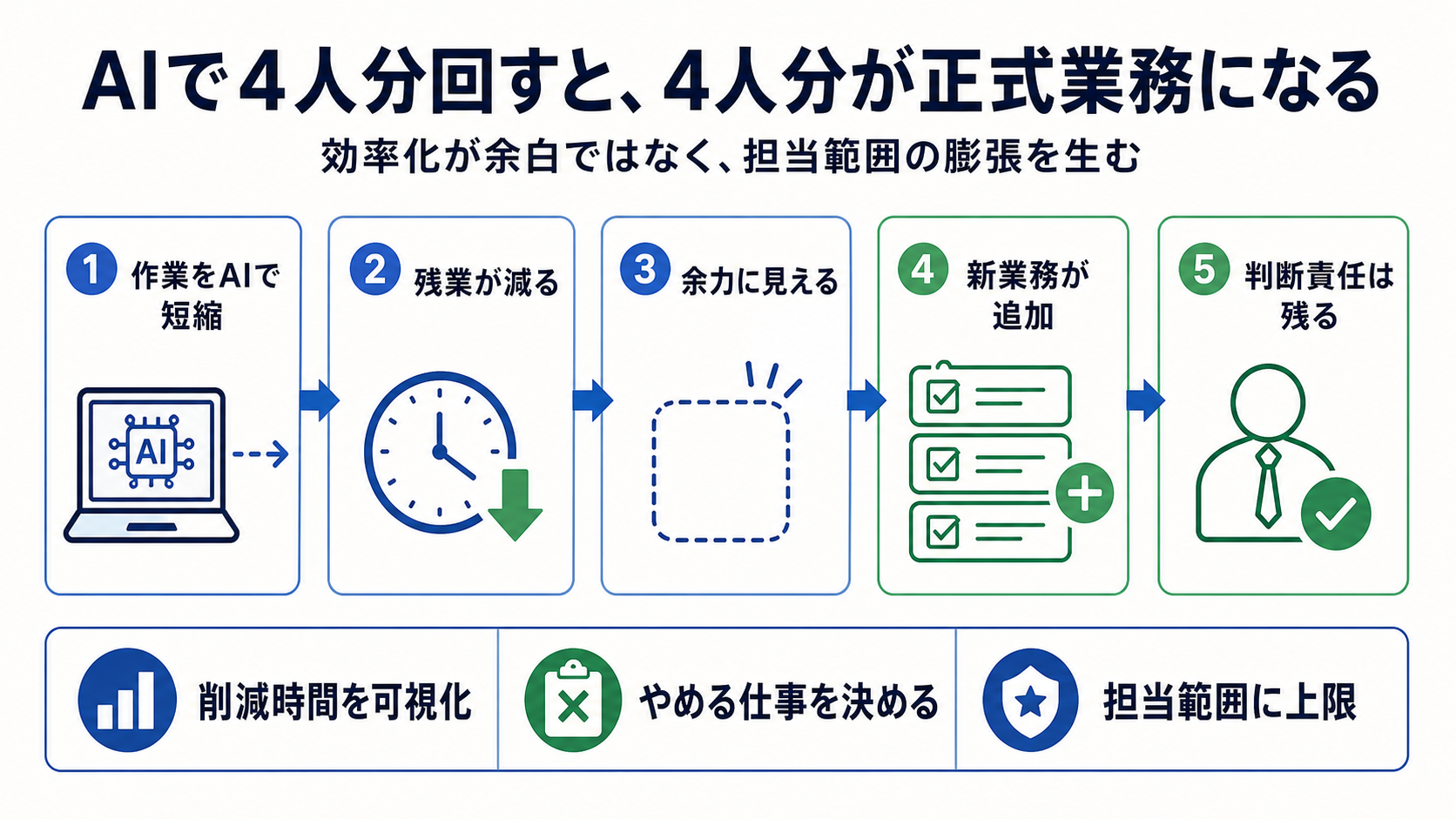
AI made me faster, but my workload did not shrink
My work expanded beyond frontend improvements for Amazon, Rakuten, and Shopify to include backend work, logistics, sales reporting, marketing, and UI and UX reviews.
This range of work could reasonably be divided among several people or specialist teams. One reason I could handle it was AI.
Delegating data organization, research, logic checks, writing, and tool creation to AI greatly reduces the work handled directly by a person. Tasks I previously would have had to decline could now be completed on time.
But being able to deliver the work does not mean the burden is small.
Reducing hours to ten minutes does not make the time savings visible
When combining Amazon statements with sales data, the output fields changed each time and the calculation logic was not documented. Previously, I had to check each field and spend hours reconciling the data.
I gave AI the statements and detailed source data, then had it reverse-engineer the calculation until it matched the payment amount. It also provided the calculation for each field, which I verified at the end. After repeating the process successfully, I made the workflow reusable.
The result: several hours of work dropped to about ten minutes.
But the organization sees not “several hours saved” but only “the work was completed on time again.”
Overtime alone does not measure the real workload
Compressing work with AI may keep overtime from increasing. Even while carrying a large workload, you can look available from the outside.
You can research complex questions with AI, turn routine processes into tools, organize discussion points before a meeting, and retrieve relevant decisions from past logs. Combine these systems and a workload that would normally break down can appear to run quietly.
Then low overtime is treated as evidence of a light workload.
In reality, one person may now handle design, decisions, anomaly detection, and final review instead of spending time on routine processing. The type of workload has changed, not necessarily its size.
Time freed by efficiency is quickly replaced with more work
If you improve efficiency without changing how work is organized, the time you free up will be filled by new tasks.
Cutting a five-hour task to 30 minutes does not mean the remaining four and a half hours go back to the worker. The scope expands: “Could you handle this too?” “If you know this area, can you take it on?”
The person also knows AI makes the work possible. It can be faster to build a system than to refuse the task. Their scope grows, they automate more, and another task arrives.
This is both an efficiency gain and an endless expansion of scope.
Separate “can do” from “owns the work”
To avoid this pattern, distinguish what someone can do from what they officially own.
Solving a problem once, operating the solution continuously, owning incidents, and balancing it with other work are different conditions.
AI speeds up prototyping. But operations still require monitoring, fixes, support, and changes to specifications. Adding a prototype to ongoing duties simply because it works creates hidden maintenance debt.
When adding a new responsibility, also decide what will be removed in exchange.
Record the time saved
The value of efficiency is hard to show by presenting only the finished tool.
At minimum, record five things: hours required before the improvement, how many times it occurs per month, minutes required afterward, what review work remains, and hours saved over a year.
For example, cutting a five-hour weekly task to 15 minutes saves more than 200 hours a year. Putting the time saved into numbers makes it clear that you did not just “make things easier”—you eliminated future work.
You can also discuss whether to use that time for other work, quality improvements, or to give it back to the person.
Do not treat one person's capacity as an unlimited organizational resource
People who use AI can handle a broader scope than before. That makes it the organization's responsibility to set limits.
If work is concentrated on someone without clear responsibilities, priorities, maintenance ownership, or a handoff plan, the organization may be left in the dark when they leave. The more it depends on one person's high output, the greater the continuity risk.
The answer is not to hand over even more work. Share the system so someone else can keep the essentials running.
Measure AI adoption by what work it eliminated
If the task list has not shrunk at all after adopting AI, the efficiency has not created breathing room for employees; it has only increased the company's throughput.
Of course, increasing throughput can be necessary during business growth. But it should not depend only on an individual's ingenuity.
Look beyond what AI made faster. Ask what work stopped, what was reassigned, and what quality improved. Efficiency benefits workers' lives only when those outcomes are designed too.
How efficiency can increase workload: an example
Viewing this situation as a simple time-saving success misses the point. The scope of responsibility expanded in the following order:
| Stage | What happened | How it looked to the organization | Work that remained with the person |
|---|---|---|---|
| 1 | Own specific tasks for Amazon and Shopify | Handling assigned work as expected | Understanding each channel's requirements |
| 2 | Use AI to speed up research, reporting, and writing | Fast delivery with little overtime | Checking AI output and handling exceptions |
| 3 | Add a Rakuten launch and logistics design | Seen as someone who can handle several areas | New research and stakeholder coordination |
| 4 | Add frontend, backend, and marketing | Appears to run the business alone | End-to-end consistency and incident responsibility |
| 5 | Add more work to the time saved through efficiency | Appears to have more capacity | Pending decisions and mental context switching |
The difficult part is that AI mainly reduces hands-on time, not the scope of responsibility. AI may calculate the data, but the person remains responsible for submitting incorrect numbers to the company. AI can draft a product page, but a person must stop policy violations and misleading claims.
In other words, work time shrinks while the number of decisions and the impact of failure grow. Calling both “effort” makes it difficult to explain the actual burden.
Treat efficiency as a formal work improvement
To make the improvement organizational rather than personal, compare the before and after on one page.
What to record about an improvement
- Processing time before: Include review time for errors as well as normal cases.
- Frequency: State whether it happens daily, weekly, monthly, or only during peak periods.
- Automated processing time after: Record the time a person is occupied, not just how long the program runs.
- Human review that remains: Include input data, outliers, final amounts, and pre-publication displays.
- Annual time saved: Multiply the time saved per task by its frequency.
- New maintenance work: Account for API or format changes and tool failures.
- How the time saved will be used: Decide whether to put it toward quality, training, breathing room, or other work.
Saying “we cut a five-hour report to 15 minutes” can make it sound fully complete in 15 minutes. Data receipt, running the process, checking for anomalies, and reviewing before submission may still remain. Documenting them avoids exaggerating the value or hiding review work.
More importantly, do not automatically assign the time saved to new work. If you save 20 hours a month, decide with a manager how many hours go to other work, quality improvements, or handoffs. If the person silently absorbs the change, the organization will keep treating every improvement as spare capacity.
A checklist for managers and employees
For managers
- Have you decided what to stop or transfer when adding new work?
- Do you distinguish “AI can do it” from “it can be operated reliably”?
- Are exceptions that only the assigned person can judge increasing?
- Are you evaluating time savings only through overtime?
- Can the work continue during leave or after the person leaves?
- Is maintenance time for improvement tools included in official workload?
For employees
- When accepting the task, did you check whether it includes ongoing operations?
- Did you distinguish a one-time prototype from official ongoing work?
- Did you record time before and after the improvement?
- Did you separate processes delegated to AI from decisions only you can make?
- Do you have priorities beyond “I can handle it, so I will”?
- Have you told your manager what will stop if you are unavailable?
If several items remain undecided, the problem is work design, not the person's efficiency. Before routing work to someone who can use AI, decide scope, maintenance responsibility, backup coverage, and how saved time will be used.
Do not assume AI makes every extra task free
A common misconception is that AI makes the marginal cost of extra work almost zero. Drafting and reporting may get faster, but input checks, exceptions, publication responsibility, and stakeholder coordination remain. More output also means more to review. Being able to generate ten drafts is not the same as safely publishing ten items.
When accepting a new task, separate the time required without AI, the steps AI can shorten, and the review steps it cannot eliminate. Also clarify whether the task is recurring or one-time. An improvement that takes one hour once is different from a permanent responsibility.
Assign a purpose to time saved
If efficiency saves 20 hours each month, decide who will use those hours and for what. For example, allocate ten to new initiatives, five to quality improvements, and five to handoffs and leave coverage. Without a decision, non-urgent work gradually fills the time until the breathing room disappears.
Before saying “I can still take on more,” list current responsibilities, pending reviews, exceptions, and next month's recurring work. Check whether the workload is sustainable during leave, incidents, and peak periods—not just on a normal day. The true limit is the scope you can maintain when AI is unavailable or its output quality drops.
Instead of sending all work to the fastest person, organizations should make that person's systems usable by others. Share procedures, decision criteria, and checks so a second person can run them. Then efficiency becomes an organizational capability rather than a dependency on one person. Do not evaluate AI adoption by how much work one employee can carry.
Conclusion
Doing the work of four people with AI is not the same as taking on the responsibility of four people.