Quality Standards for Internal Tools: Accurate, Clear, and Reliable
When building an internal tool, it is tempting to aim for a polished product packed with features.
But in day-to-day work, perfection is not always what matters most.
What matters more is getting accurate results, being easy to use, and staying reliable.
For a tool used at work, stability and ease of explanation are more valuable than flash.
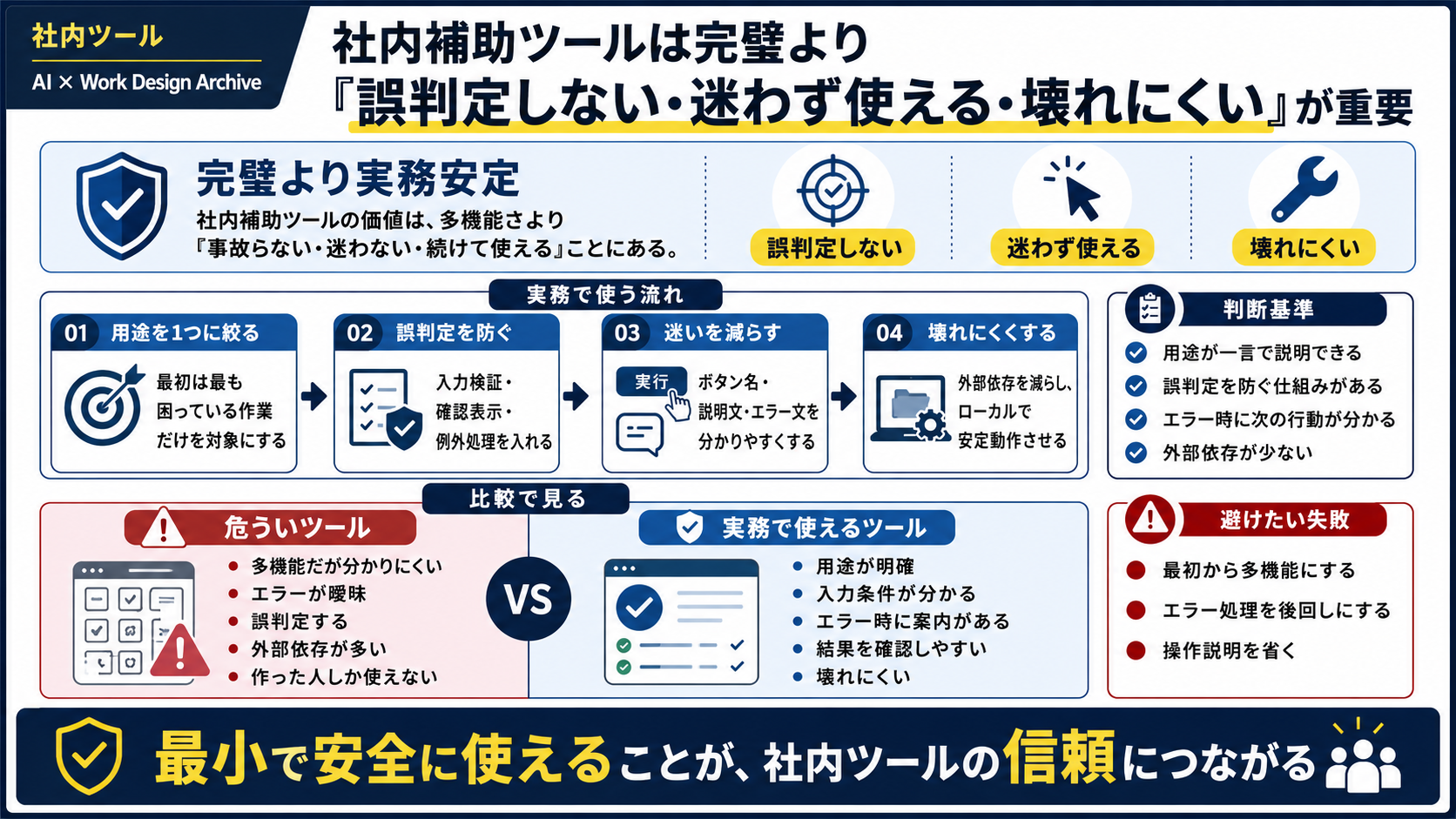
Internal tools support day-to-day business decisions
Internal tools serve a different purpose from customer-facing products.
Their users are colleagues. The goal is to reduce effort, make checks more consistent, and prevent mistakes.
That makes the fundamentals more important than flashy features: preventing input errors, making checks straightforward, and presenting clear results.
Incorrect results are especially dangerous. A tool will not be trusted if it produces the wrong answer, even when it is convenient. Worse is an incorrect answer that looks right. A quality internal tool stops when something goes wrong and says when it cannot reach a decision.
Easy-to-use tools reduce training costs
An internal tool should not be usable only by the person who built it.
Other people should be able to use it without getting lost.
When buttons, input requirements, error handling, and output locations are clear, less time is needed to explain the tool.
Ease of use is both a UX concern and a way to reduce training costs. If every handoff requires another explanation, the tool may appear to save time while adding a separate operational burden.
For tools that work with CSV or Excel files, users need to see which columns will be read, which rows will be excluded, and what the saved file will contain. If users can only think, “This is probably right,” convenience becomes a path to an incident.
Robust architecture reduces operational burden
An internal tool may remain in use long after it is built.
A tool that relies on external services, requires complicated setup, or runs only on a particular device is costly to maintain.
A single HTML file, local operation, input validation, and clear error messages may sound modest, but they make a strong foundation.
Reliability is a core quality of internal tools. Most do not have a dedicated operations team, so they should have few dependencies, be easy to recover, and protect the user's source data.
Start with a safe minimum instead of aiming for perfection
Adding every feature from the start makes the tool harder to use and more prone to bugs.
Begin by handling one especially painful task reliably.
Add features only after the tool gets the basics right: accurate results, clear operation, and reliability.
For internal tools, trust comes from being small and safe to use. In the first release, focus on whether users can complete the main task without confusion, review the output, and stop safely when something is wrong—not on the length of the feature list.
Internal tools are judged by whether they
Accuracy, clarity, and reliability matter more than perfection
The quality criteria shape how you build the same tool
If the only goal is to make an internal tool more convenient, it is easy to keep adding features. If the goal is to reduce operational incidents, the design starts with review, safe stops, instructions, and saving.
- Many features, but confusing to use
- Vague error messages
- Incorrect results are hard to spot
- The output cannot be reviewed before saving
- Many external dependencies
- Only the creator can use it
- Its purpose is clear at a glance
- Input requirements are visible in the interface
- It stops when it cannot make a reliable decision
- Results can be reviewed before saving
- Runs locally and is resilient
- The main actions are clear without extra explanation
A practical order for designing an internal tool
Use these steps to turn the ideas into operational improvements, a working tool, and a concrete acceptance review.
A quality checklist before release
When reviewing an internal tool, check not only whether it runs but also whether it leaves a path to an incident.
Minimum checks
- The purpose can be explained in one sentence
- Input requirements are visible in the interface
- The tool stops if a required option is missing
- The preview matches the saved output
- The error message explains what to do next
- The source file is not overwritten
Failure patterns to avoid
- Adding too many features from the start
- Putting error handling off until later
- Skipping usage instructions
- Focusing on convenience while ignoring safety
- Calculating the saved output separately from the preview
- Depending on the creator's memory